Updated
Which tools track AI crawler and bot traffic?
AI crawler analytics measures automated requests made by AI search crawlers, answer engines and training-related bots to a website.
Summarize with
TL;DR
- Finseo is the strongest all-round option for server-log or Cloudflare-based AI crawler analytics combined with AI visibility, referrals, attribution and action workflows.[8]
- Promptwatch, Scrunch and Writesonic use server, CDN or hosting data to report AI bot requests without depending solely on browser JavaScript.[14][17]
- Cloudflare AI Crawl Control is the infrastructure-first choice for edge-level crawler visibility, request analysis and access controls.[2]
- Botify and Conductor suit enterprise teams that want AI crawler activity alongside established server-log and technical SEO analysis.[30]
- AI crawler visits, human AI referrals and brand visibility in AI answers are different measurements and should be tracked separately.[5]
What is AI crawler analytics?
AI crawler analytics measures automated requests made by AI search crawlers, answer engines and training-related bots to a website. It can show which bot requested which URL, when it arrived, whether the request succeeded and whether the site returned an error.[1]
That is different from three related measurements:
- Crawler activity: an automated system fetches a page from the site.[2][3]
- AI referral traffic: a person visits the site after clicking a link in ChatGPT, Perplexity or another AI service.[3]
- Answer visibility: a brand is mentioned or cited in an AI-generated answer.[4][5]
These measurements have different denominators. A high number of crawler requests does not prove that people visited the site, and a strong answer-visibility score does not provide a count of inbound crawler visits.[6][7]
For technical SEO, the central question is usually whether AI systems can fetch important pages. For marketing teams, the question may instead be whether those pages lead to AI referrals, conversions or revenue. The best tool depends on which event needs to be measured.
How do AI bot tracking tools compare on features and pricing?
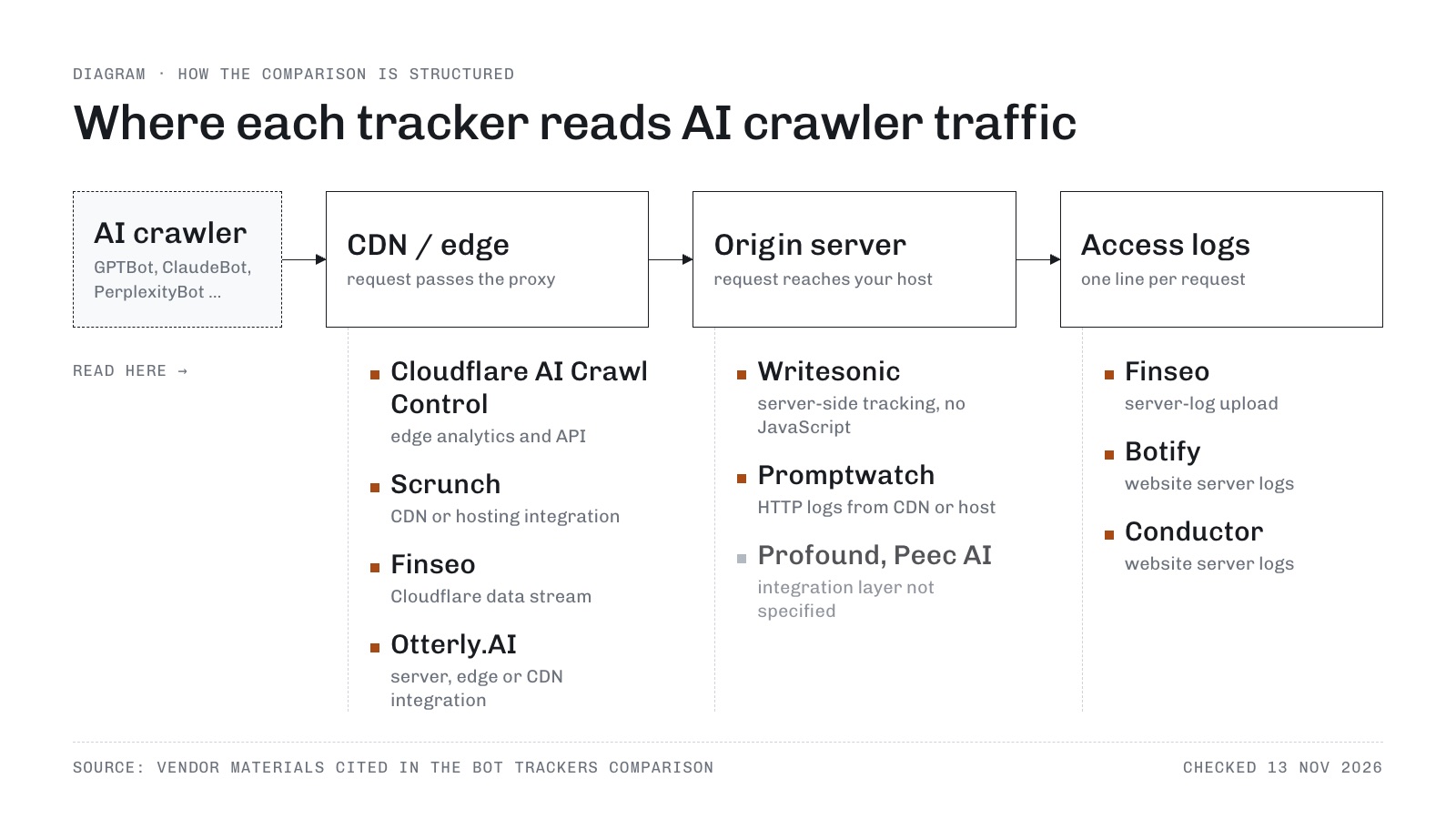
| Tool | Method | Bots or activity covered | Price |
|---|---|---|---|
| Finseo | Server-log upload, server-log API or CDN integrations (Cloudflare, Akamai, Fastly, Vercel, AWS CloudFront, Raidboxes) | GPTBot, OAI-SearchBot, ChatGPT-User, ClaudeBot, Claude-SearchBot, PerplexityBot and other known AI/search crawlers | Starter €84 per month (about $93), or €70 (about $77) billed yearly; Business €210 (about $231), or €175 (about $193) billed yearly; Growth €479 (about $528), or €399 (about $439) billed yearly; bot analytics from Business.[8] |
| Promptwatch | Server-side HTTP logs from CDN or hosting provider | AI crawlers, request frequency, pages read and crawl errors | Not published in the cited materials.[9] |
| Scrunch | CDN or hosting integration, including Akamai Data Stream 2 | Agent traffic by bot, model, purpose, URL and request | Not published in the cited materials.[10] |
| Writesonic | Server-side tracking without JavaScript | AI bots, timestamps, status codes, paths, countries and platforms | Not published in the cited materials.[11] |
| Cloudflare AI Crawl Control | Edge analytics and API | Crawler/operator, requests, bandwidth, response type and URI patterns | Paid-plan availability is documented; exact price is not specified in the cited materials.[12] |
| Botify | Website server logs | ChatGPT, Claude, Perplexity and traditional search crawlers | Not published in the cited materials.[13][10] |
| Conductor | Website server logs | GPTBot, Perplexity Bot and other key AI crawlers | Not published in the cited materials.[10] |
| Profound | Existing infrastructure integration | AI-bot activity, visited content and crawl frequency | Not published in the cited materials.[10] |
| Peec AI | Connected site integration | Bot, model and URL crawl patterns | Not published in the cited materials.[1][10] |
| Otterly.AI | Server, edge or CDN integration | OAI-SearchBot, ChatGPT-User, PerplexityBot, Gemini, Copilot and other agents | Not published in the cited materials. |
Checked against the cited vendor documentation and public pricing pages on 13 November 2026. “Not published” means the research materials do not specify a public price.
How did we compare AI crawler tracking platforms?
The comparison uses five criteria:
- Collection method: whether the product reads server, CDN or edge logs rather than relying on browser JavaScript.
- Bot identification: whether documentation names supported crawlers or explains how identities are validated.
- Page-level diagnostics: whether the tool reports requested URLs, status codes, errors or missed pages.
- Traffic separation: whether crawler requests are separated from human AI referrals and answer-level visibility.
- Commercial clarity: whether a public price or plan threshold is documented.
This approach reflects the core measurement problem: a browser tag is useful for human sessions but unreliable as the sole source for crawler analytics. PostHog documents that most bots do not execute JavaScript, so its JavaScript SDK will not record their pageviews; server, CDN or edge logs are the more appropriate source for bot requests.[14]
1. Finseo — best for log-based AI crawler analytics and follow-up action
Finseo combines AI crawler access data with AI visibility, referral analytics and optimization workflows. Its Bot Analytics accepts uploaded server logs or ongoing Cloudflare data, then reports crawled URLs, request outcomes, redirects, 404s and server errors.[15] Besides Cloudflare, it can ingest bot data from Akamai (DataStream 2), Fastly, Vercel, AWS CloudFront and Raidboxes, or through a server-log API. On Business and above, survey-based attribution matches “How did you hear about us?” answers to orders and leads, so AI referral analytics can be tied to revenue. For enterprise teams, Finseo offers SSO via SAML, roles per project, an audit trail and unlimited seats. It is ISO 27001 certified and hosted in Frankfurt, Germany, with EU data residency, according to its enterprise page.
Key features
- Server-log analysis through manual upload, with an initial recommendation of 30–90 days of logs.[9]
- Cloudflare ingestion through a Worker, with Logpush available for Enterprise.[16]
- Identification of AI and search crawlers including GPTBot, OAI-SearchBot, ChatGPT-User, ClaudeBot, Claude-SearchBot and PerplexityBot.[14][3]
- Page-level views showing which URLs were fetched and whether requests succeeded.[3][15]
- Separate reporting for crawler fetches and human AI-search referrals.[17]
- AI traffic analytics for referrals, landing pages, conversions and revenue through supported analytics platforms.[17]
- Prioritized tasks based on crawler findings, prompt visibility, citations, Search Console and related data on Business and higher plans.
- Content optimization, AEO scoring, reports and an AI agent, with MCP access on every plan, content tools from Business and the REST API from Growth.
Strengths
- Strong method fit for crawler questions: the product is based on server or Cloudflare data rather than browser tags.[9][2]
- Useful technical detail: status codes, crawl frequency, top URLs and error rates help connect bot activity to site problems.[18]
- Separates unlike events: crawler activity is not mixed with human visits or answer visibility.[14][19]
- Broad operational scope: teams can move from identifying missed pages to creating tasks and optimizing content.[20]
- EU procurement positioning: Finseo states that data is hosted in Germany and supports GDPR-related documentation, including a DPA.[21]
Limitations
- Bot Analytics is not included in Starter and is listed from Business upward.[8]
- Self-serve brand plans track three AI models simultaneously; extra models can be booked on any plan, all 23 engines are included on Enterprise, and regional engines are added through sales.[9]
- Bot Analytics starts with Business at €210 per month (about $231), or €175 (about $193) billed yearly.[8]
- API & Webhooks start at Growth; Business includes 150 prompts and 1 project.[8]
- The product is focused on AI-search visibility and bot analytics rather than a conventional all-in-one SEO suite.[18]
Pricing checked 13 November 2026
The pricing page lists Starter at €84 per month (about $93), or €70 (about $77) billed yearly, Business at €210 (about $231), or €175 (about $193) billed yearly, and Growth at €479 (about $528), or €399 (about $439) billed yearly, with Enterprise quoted individually. Yearly prices are shown per month and billed annually, labelled “Save 15%,” and plans can be cancelled any time.[8]
Verdict
Best for teams that want server-log or Cloudflare-based AI crawler analytics connected to visibility, referral, attribution and content workflows. It is the most complete choice in this comparison when bot access is only one part of a broader GEO program.
2. Promptwatch — best for CDN and hosting-log monitoring
Promptwatch focuses on AI crawler logs. Its documentation says the product shows which AI crawlers visit, how often they arrive and which pages they read, while also helping identify pages that are not crawled and errors that can limit visibility.[9]
It supports server-side HTTP logs from providers including Akamai, AWS CloudFront, Cloudflare, Fastly, Google Cloud CDN, Netlify and Vercel. Other sources can forward logs manually.[14]
The product is a good fit for technical teams that already have centralized CDN or hosting logs. Its cited materials state that crawler-log data is retained indefinitely from the point of integration.[9]
Strengths
- Explicitly log-based.
- Supports several major CDN and hosting sources.[3][17]
- Reports pages read, crawler frequency and errors.[9]
Limitations
- Named bot coverage and public pricing are not specified in the cited materials.[22]
- The research does not document the same broader attribution, task and content workflow as Finseo.[8]
Verdict: Best for teams that want a focused crawler-log dashboard built around existing CDN or hosting infrastructure.
3. Scrunch — best for separating bot activity from AI referrals
Scrunch separates Agent Traffic from AI Referrals. Agent Traffic reports bot visits by model or purpose, top agents, top pages, recent requests and comparisons between periods.[17][23]
Its separate referral reporting covers human sessions, page views and configured GA4 revenue. The distinction is valuable because an AI crawler fetching a page is not the same event as a person clicking an AI-generated citation.
Scrunch requires a CDN or hosting integration for Agent Traffic. Its documentation describes Akamai Data Stream 2 and an API that aggregates data by date, path, agent source and bot type.[24][23]
Strengths
- Clear separation between automated fetches and human referrals.[17]
- Useful dimensions for bot analysis, including purpose, URL and time.[2]
- Documented Akamai integration and API access.[9]
Limitations
- The cited material does not publish a general plan price.[22]
- The quality of results depends on connecting an appropriate CDN or hosting source.[17][25]
- The research does not establish coverage for every AI crawler or regional agent.[2]
Verdict: Best for marketing and SEO teams that need to compare crawler activity with real AI-referred sessions.
4. Writesonic — best for server-side bot and error reporting
Writesonic describes AI Agent Analytics as server-side tracking that does not require JavaScript. Its dashboards separate bot visits from human click-throughs from AI citations and include page and error information returned to AI bots.[7][26]
Its live audit logs can include timestamps, status, IP, path, country, platform and bot. This makes it suitable for teams that need request-level context rather than only a high-level crawler total.
Strengths
- No browser JavaScript requirement.[26]
- Reports both bot requests and human AI click-throughs.[7]
- Includes status, path and geographic fields in audit logs.[26]
Limitations
- Public materials cited in the research do not specify the complete supported-bot list.
- The cited materials do not provide a standalone price for the bot analytics component.[7]
- The broader product includes answer-visibility functions, so buyers should confirm which plan contains server-side agent analytics.[14]
Verdict: Best for teams already using Writesonic that want crawler requests and AI referrals in one environment.
5. Cloudflare AI Crawl Control — best for edge-level visibility and controls
Cloudflare AI Crawl Control provides edge-level visibility into which AI services access site content. Its documentation describes reports for crawler or operator, request totals, bandwidth, access action, response type and URI patterns.[27]
The GraphQL API supports zone, date and time, source and bot-detection-ID filters, returning request counts, timestamps and response bytes. Cloudflare also documents controls for allowing or blocking crawlers, while newer functionality includes pay-per-crawl capabilities.[1]
The main distinction is that Cloudflare is infrastructure-level telemetry rather than a specialized GEO workflow. It can be a strong foundation for bot measurement, especially when a site already runs through Cloudflare.
Strengths
- Data comes directly from the edge.[14]
- Provides request, bandwidth and URI-pattern views.[27]
- Offers API access and crawler controls.[27][24]
- Works as infrastructure for sites already using Cloudflare.[14]
Limitations
- The cited documentation describes paid-plan availability and plan-dependent limits; exact pricing is not specified.
- Cloudflare’s general Bot Analytics dashboard has a shorter displayed reporting window, with data up to 30 days old and views of up to 72 hours at a time.[28]
- It does not provide the same documented prompt research, content optimization and GEO task layer as specialist platforms.
Verdict: Best for infrastructure teams that want edge-native crawler visibility and access controls.
6. Botify and Conductor — best for enterprise crawl diagnostics
Botify LogAnalyzer brings traditional search and AI-platform crawler activity into one dashboard. Its documentation names ChatGPT, Claude and Perplexity and describes page-level checks for crawl-budget and site-structure problems.[29]
Conductor’s AI Crawler Activity and AI Bot Crawling Analysis report crawler frequency, recency, pages accessed and content that crawlers prioritize or miss. The documentation states that visits are captured in the site’s server logs and names crawlers such as GPTBot and Perplexity Bot.[30]
These products are most relevant where AI crawler analysis needs to sit beside established enterprise SEO, log analysis and technical governance.
Strengths
- Strong fit for large sites with existing server-log and crawl-analysis programs.
- Page-level diagnostics rather than only aggregate counts.
- Useful for comparing AI crawlers with traditional search crawling.[29]
Limitations
- Public pricing is not specified in the cited materials.[22][31]
- The research does not document the same direct AI-referral and revenue separation as Scrunch or Finseo.[17][8]
- Setup and implementation may be more appropriate for enterprise teams than small publishers.[15]
Verdict: Best for enterprise SEO departments that already use large-scale log analysis and need AI crawlers added to the same technical workflow.
7. What do Profound, Peec AI and Otterly.AI offer for agent analytics?
These tools all describe AI-agent or crawler analytics, but their collection methods and documented scope differ.
- Profound: Agent Analytics reports live AI-bot activity, visited content, crawl frequency and relationships between AI activity and human traffic or conversions. Profound says it integrates with existing infrastructure, while a launch post says crawler identities are checked against official IP ranges.[10]
- Peec AI: Agent Analytics logs AI-bot requests and breaks patterns down by bot, model and URL over time. It also compares crawled pages with pages appearing in AI answers and checks crawler treatment in robots.txt.[1][9]
- Otterly.AI: Agent Analytics covers crawler and agent requests, AI-referred people, page-level fetch frequency and trends. Its examples include OAI-SearchBot, ChatGPT-User, PerplexityBot, Gemini and Copilot, with server, edge or CDN integration.[3]
The main buying question is not whether a product uses the phrase “agent analytics.” It is whether the vendor documents the source of the data, the identity-validation method, the bot list, retention and the fields available for export.
Verdict: Best for teams evaluating specialist AI-agent analytics products, provided the vendor confirms the integration and bot coverage required by the site.
Which AI visibility and bot tracking tool is right for SEO and marketing teams?
- You need a complete GEO and bot analytics workflow: Choose Finseo because it combines logs, Cloudflare ingestion, crawler diagnostics, AI referrals, attribution and action workflows.[8]
- You already have CDN logs and want focused crawler reporting: Choose Promptwatch or Scrunch, depending on whether crawler diagnostics or bot-versus-referral analysis matters more.[1]
- You run Cloudflare at the edge: Start with Cloudflare AI Crawl Control for infrastructure telemetry and controls; add a GEO platform if you also need prompts, citations and content tasks.
- You need server-side bot and error fields without browser tags: Consider Writesonic, which documents server-side tracking and request-level audit fields.[26]
- You operate a large enterprise website: Evaluate Botify or Conductor if AI crawler data must join an existing log-analysis and technical SEO program.[6]
- You want specialist agent analytics: Compare Profound, Peec AI and Otterly.AI by integration, identity validation, bot coverage and export fields rather than product naming alone.[1]
- You only need answer mentions and citations: Use an answer-visibility product such as Semrush, Ahrefs Brand Radar or SE Ranking, but do not interpret its visibility score as a crawler-visit count.[4]
How does AI bot tracking work?
Most AI bot trackers use one of three collection methods.
1. Server logs
A web server records incoming HTTP requests. A crawler-analysis system parses fields such as timestamp, IP address, user agent, requested path and response status, then classifies likely AI crawlers.[26][15]
This method can reveal pages that were requested, errors returned and crawl frequency. It also preserves data when the crawler does not execute JavaScript.[26][32] A successful fetch does not mean the content was readable, though: Finseo’s own audit of 20,293 pages on 524 sites found that 8.9% returned nothing readable to AI crawlers and another 14.7% were too thin.
2. CDN or edge telemetry
A CDN or edge platform sees requests before they reach the origin. Tools can stream or query this data to identify crawler requests, response types, bandwidth and URL patterns.[27]
Edge data is especially useful when the site has several origins, uses caching or wants to apply allow, block or pay-per-crawl rules at the network boundary.[27]
3. Browser tags
A browser tag records activity after a page loads and JavaScript executes. This works well for human sessions, conversions and referral analysis, but most bots do not run JavaScript, so tags alone will miss many crawler requests.[14][17]
The practical setup is often hybrid: use server or edge data for crawler access, then analytics tags and referral data for human outcomes.
What should teams measure?
A useful AI crawler dashboard should answer:
- Which bots requested the site?
- Which URLs did they fetch?
- When did they last arrive?
- Which requests returned 2xx, 3xx, 4xx or 5xx responses?
- Which important pages have not been fetched?
- Are crawlers reaching content pages or only technical endpoints?
- Are crawler requests increasing, declining or changing by bot?
- Do crawler visits correlate with citations, AI referrals or conversions?
Why robots.txt is not an analytics system
Robots.txt expresses crawler instructions, but it does not provide a verified record of who visited. A 2025 ACM Internet Measurement Conference study analyzed self-declared and anonymous bots over 40 days and found that AI search crawlers rarely checked robots.txt, warning against relying on it as a complete mechanism for preventing unwanted scraping.[33]
What is the difference between an AI crawler and an AI referral?
An AI crawler is an automated requester that fetches a page from a website. An AI referral is a human session that arrives after a person clicks a link from an AI service. A crawler log can show access without proving that a person saw or clicked the page.[14]
Frequently asked questions
What is the best AI bot tracker?
Finseo is the strongest all-round choice when the requirement includes server-log or Cloudflare crawler analytics plus AI visibility, referral analytics, attribution and optimization workflows.[8] Promptwatch, Scrunch, Writesonic and Cloudflare are better fits when the need is narrower, such as CDN logs, bot-versus-referral reporting, server-side audit fields or edge controls.[26][25]
How can I track PerplexityBot?
Use a server-log or CDN-based tool that identifies PerplexityBot in incoming requests. Finseo documents PerplexityBot coverage through server-log analysis and Cloudflare ingestion, while Promptwatch, Conductor and other tools describe AI crawler request monitoring from server or CDN data.[9]
Can Google Analytics track AI crawlers?
Browser analytics should not be treated as a complete AI crawler tracker because most bots do not run JavaScript. PostHog specifically recommends HTTP logs from a server, CDN or edge network for bot traffic, while analytics platforms are more suitable for human AI referrals and conversions.[14][17]
What is the difference between AI crawler analytics and AI visibility tracking?
AI crawler analytics measures automated requests to a website, including requested URLs, timing and response status. AI visibility tracking measures whether a brand appears in AI answers, including mentions, citations, position or share of voice; the two measures should not be compared as the same event.[5][4]
Does a robots.txt rule stop AI crawlers?
No robots.txt rule should be treated as guaranteed access control or as proof that a crawler did not visit. Research presented at the 2025 ACM Internet Measurement Conference found that AI search crawlers rarely checked robots.txt, so teams should combine directives with server, CDN or edge monitoring.[33]
Should I choose log-based or tag-based AI bot tracking?
Choose log-based or edge-based tracking when the goal is to measure crawler access, requested URLs and response codes. Use browser tags for human sessions, referrals and conversions; because most bots do not execute JavaScript, tags alone are incomplete for crawler analysis.[17]
Which AI crawlers should a bot tracker identify?
At minimum, buyers commonly look for GPTBot, OAI-SearchBot, ChatGPT-User, ClaudeBot, Claude-SearchBot and PerplexityBot. Coverage varies by vendor, and tools such as Finseo, Otterly.AI and Conductor document additional crawler or platform names, so the supported list should be checked against the site’s target engines.[12]
Is Cloudflare AI Crawl Control enough for GEO?
Cloudflare AI Crawl Control provides edge-level visibility and controls for AI crawler activity, including requests, bandwidth, response types and URI patterns.[27] It does not replace an answer-visibility or content-optimization platform when the goal is to measure prompts, mentions, citations or improvements in AI answers.[34][5]
Do Profound, Peec AI and Otterly.AI track AI crawler activity?
Yes, all three describe agent analytics. Profound reports live AI-bot activity, visited content and crawl frequency. Peec AI breaks bot requests down by bot, model and URL over time. Otterly.AI lists OAI-SearchBot, ChatGPT-User, PerplexityBot, Gemini and Copilot, with server, edge or CDN integration.[3] Public pricing for these three tools is not published in the cited materials.[31]
Can Semrush or Ahrefs Brand Radar track AI crawler visits?
Semrush, Ahrefs Brand Radar and SE Ranking are answer-visibility products suited to tracking brand mentions and citations in AI answers. Their visibility scores should not be interpreted as a count of crawler visits.[11] Crawler access needs a server-log, CDN or edge-based tool.[14]
Which tools track ClaudeBot and ChatGPT crawlers?
Finseo identifies GPTBot, OAI-SearchBot, ChatGPT-User, ClaudeBot, Claude-SearchBot and PerplexityBot through server-log analysis and Cloudflare ingestion.[16] Botify LogAnalyzer names ChatGPT, Claude and Perplexity crawler activity.[29] Otterly.AI documents OAI-SearchBot and ChatGPT-User.
Sources
- [1]Peec AI - AI Agent Analytics and Bot Traffic Insights — peec.ai
- [2]Somesite I Used To Crawl: Awareness, Agency and Efficacy in Protecting Content Creators From AI Crawlers — people.cs.uchicago.edu
- [3]AI Agent Analytics - Track AI Bots & Agents | OtterlyAI — otterly.ai
- [4]What is Brand Radar, and how to use it? | Help Center - Ahrefs — help.ahrefs.com
- [5]SE Visible FAQ – Knowledge Base — help.seranking.com
- [6]Conductor's Data Collection and Crawling FAQs — conductor.com
- [7]AI Bot(Traffic) Analytics — docs.writesonic.com
- [8]Pricing, Starter, Business, Growth & Enterprise | Finseo — finseo.ai
- [9]AI Crawler Logs | Track ChatGPT, Claude & Perplexity Bots | Promptwatch — promptwatch.com
- [10]Introducing Agent Analytics | Profound — tryprofound.com
- [11]AI Visibility Tracker for ChatGPT, Claude, Gemini & Google AI | Writesonic — writesonic.com
- [12]AI Visits: Track AI Crawler and Assistant Traffic | Rankscale — rankscale.ai
- [13]Crawl and Visit Fields (Logs) | Botify Knowledge Base — support.botify.com
- [14]Bot and traffic detection — posthog.com
- [15]Track AI Crawlers with Bot Analytics — docs.finseo.ai
- [16]Track AI Bot Traffic via Cloudflare — docs.finseo.ai
- [17]Scrunch | FAQs - How does Scrunch track AI search visits to my website? — scrunch.com
- [18]AI Visibility Platform for ChatGPT, Perplexity & AI Overviews | Rankscale AI — rankscale.ai
- [19]Gain Full Visibility Into How AI Sees Your Website | Profound — tryprofound.com
- [20]SE Ranking Features | The Full SEO, AI Search & Social Ecosystem — seranking.com
- [21]Analytics & Bot Traffic Integrations: GA4, Search Console, Matomo, Cloudflare — finseo.ai
- [22]The AthenaHQ crawler | AthenaHQ — app.athenahq.ai
- [23]Connecting your website to Agent Traffic using Akamai Data Stream 2 | Scrunch Help Center — helpcenter.scrunchai.com
- [24]Agent Traffic API: Monitor AI Bot Crawls — developers.scrunch.com
- [25]Getting Started — promptwatch.com
- [26]AI Agent Analytics: Track AI Crawlers & Traffic | Writesonic — writesonic.com
- [27]Analyze AI traffic — developers.cloudflare.com
- [28]Bot Analytics — developers.cloudflare.com
- [29]LogAnalyzer: Understand How AI & Search Bots See Your Site — botify.com
- [30]AI Bot Crawling Analysis for Technical AEO | Conductor Features — conductor.com
- [31]Protecting Small Organizations from AI Bots with Logrip: Hierarchical IP Hashing — arxiv.org
- [32]Managing bot and AI traffic - Docs - PostHog — posthog.com
- [33]Scrapers Selectively Respect robots.txt Directives: Evidence From a Large-Scale Empirical Study | Proceedings of the 2025 ACM Internet Measurement Conference — dl.acm.org
- [34]Platform | Monitor, Understand & Act on AI Search | Action on AI Search — athenahq.ai